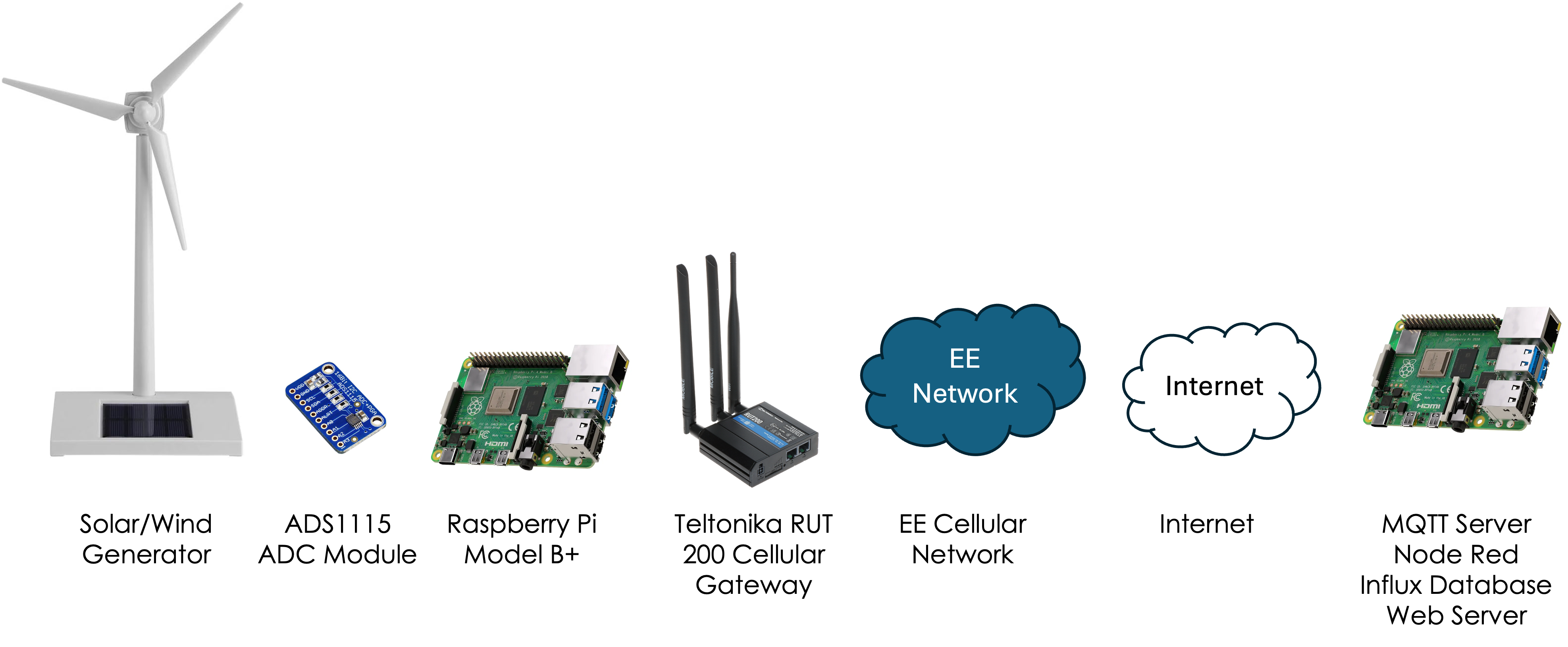
Wind / Solar Generator → ADS1115 → Raspberry Pi → MQTT → Node-RED → InfluxDB → Flask
Overview
This demo has been put together to simulate Energy Generation using solar panels or a wind turbine. The demo uses the solar panel to determine if there is any light and, using the ADS1115 ADC module, measures the electricity generated. If there is no energy being generated, it switches to wind generation by turning on a motor to simulate the wind turbine spinning and generating electricity.
Data is then collected by the Raspberry Pi, sent over the internet via the Teltonika RUT200 into a database, analysed and visualised on a web page, with the ability to set alerts.
Data Flow
- Wind / Solar Generator produces electrical output from the solar panel and wind turbine.
- ADS1115 ADC measures the voltage signals from the solar panel and wind turbine outputs.
- Raspberry Pi reads ADC values, converts them into engineering units, and publishes MQTT telemetry.
- Teltonika RUT200 provides the cellular connection and routes traffic to the internet.
- Home Assistant Mosquitto receives the MQTT messages.
- Node-RED subscribes to solardemo/#, decodes the payload, and extracts fields.
- InfluxDB 1.x stores points in database motordemo.
- Flask reads latest/history from Influx and displays dashboard.html.
MQTT
Topic: solardemo/#
Payload: Voltage readings and status values published by the Raspberry Pi (decoded in Node-RED).
InfluxDB Schema
Database: motordemo
Measurements: solar, wind, motor
Fields:
- value (float) — voltage values for solar and wind
- value (integer) — motor/source state (0 = solar, 1 = wind)